If your WordPress website is hacked, take it offline from outside WordPress, reset every password from a clean computer, clean the site properly, then ask Google to review it. Updating alone won't remove a backdoor that's already planted. In May 2026, ASD's ACSC warned that attackers were using compromised WordPress sites of legitimate Australian businesses to push malware onto visitors.
WordPress runs a large share of the web, so it's the platform attackers build their tools for first. The software itself is rarely the weak point. Sites get hacked when patches fall behind and passwords get reused.
Why WordPress sites get hacked
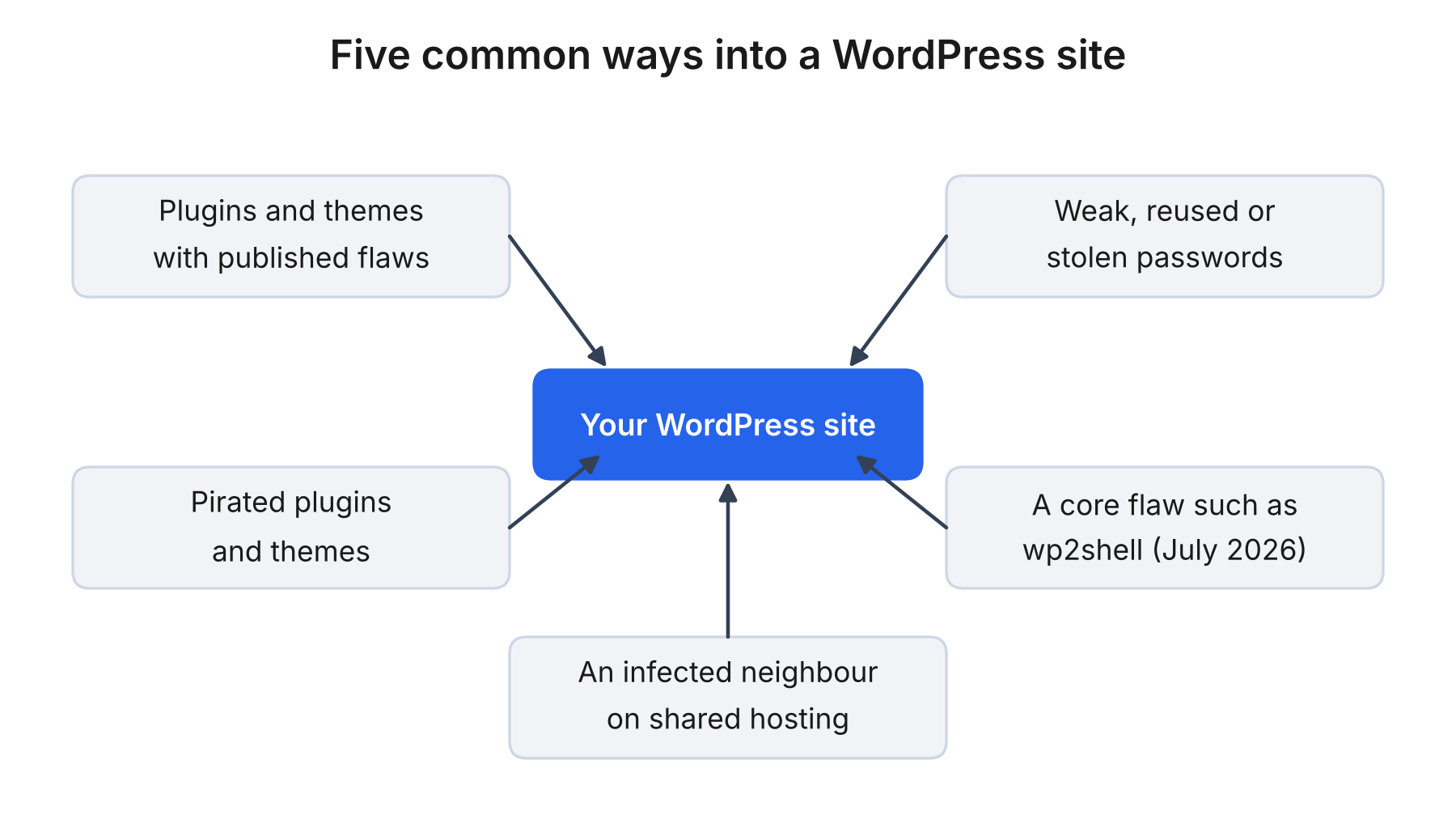
The usual routes in are the parts bolted onto WordPress. A plugin or theme with a published flaw is a well-known way in, and it stays exposed for as long as it sits unpatched on your site. Stolen, reused or weak passwords are another, especially on accounts without multi-factor authentication. Pirated plugins and themes can arrive with malware built in. Core isn't immune either, as wp2shell showed in July 2026, and an infected neighbour on shared hosting can spread to you.
Signs your WordPress website has been hacked
- A Google or Chrome warning on your site Google flags sites it believes are hacked. The warning can appear in search results, in Chrome and in the Security Issues report.
- Redirects to spam or scam pages, sometimes only on mobile or when visitors arrive from a Google result Attackers can hide these from the owner, so you browse your own site and see nothing wrong.
- An administrator you didn't create A rogue admin gives an attacker a way back in even after you change your password.
- Pages or posts you didn't write Spam pages and odd links can show up in Google results before they show up in WordPress.
- A host notice about malware, outbound spam or a suspended account Hosts can suspend accounts that send spam or serve malware.
A host outage or plugin conflict can look similar. Open the site on a phone using mobile data, check the Security Issues report in Google Search Console, and look at the Users screen in WordPress. A clean-looking site still isn't proof of a clean one, because conditional redirects hide from the owner.
What to do in the first hour
- Take the site offline from outside WordPress. Put a holding page up at your hosting control panel or DNS, through a service like Cloudflare. A maintenance plugin runs inside a site the attacker may control. Being offline costs you enquiries, and for a shop that stings, but a few hours down beats weeks of warnings.
- Call your host. Ask for access logs, the date of the earliest suspicious file and any clean backups.
- Copy the hacked site. Download the files and database and label them. It's evidence and a last resort, so don't restore from it.
- Reset credentials from a clean computer. Scan that machine first, because an infected laptop can hand your new passwords straight back. Change the host panel, SFTP, database and WordPress admin passwords in that order, then regenerate the secret keys in wp-config.php.
- Secure the admin mailbox. WordPress sends password resets there, so whoever controls that inbox controls the site. Turn on multi-factor authentication through Microsoft 365 for business, or move to managed business email hosting.
Keep a one-page note as you go. Write down what you saw, when, and what changed recently. The host, Google and possibly the OAIC will all want it.
Why hackers target small business websites
Many attacks are automated, so a small site is as easy a target as a large one. Once inside, attackers plant spam pages, send mail from your domain, steal logins or redirect visitors to malware. That last one is the reason to move fast. ASD's ACSC reported that the hijacked Australian sites sent visitors to fake verification prompts that delivered Vidar Stealer, a password-stealing program that mainly targets Windows.
How to clean a hacked WordPress site
You'll see the same story on the WordPress.org support forums, where people updated everything and got hacked again. Patching closes the way in, but it doesn't remove what an attacker already left behind. The wp2shell flaw (CVE-2026-63030 and CVE-2026-60137) is the current example. WordPress patched it on 17 July 2026, and researchers reported attackers using it to install webshells, which an update doesn't remove.
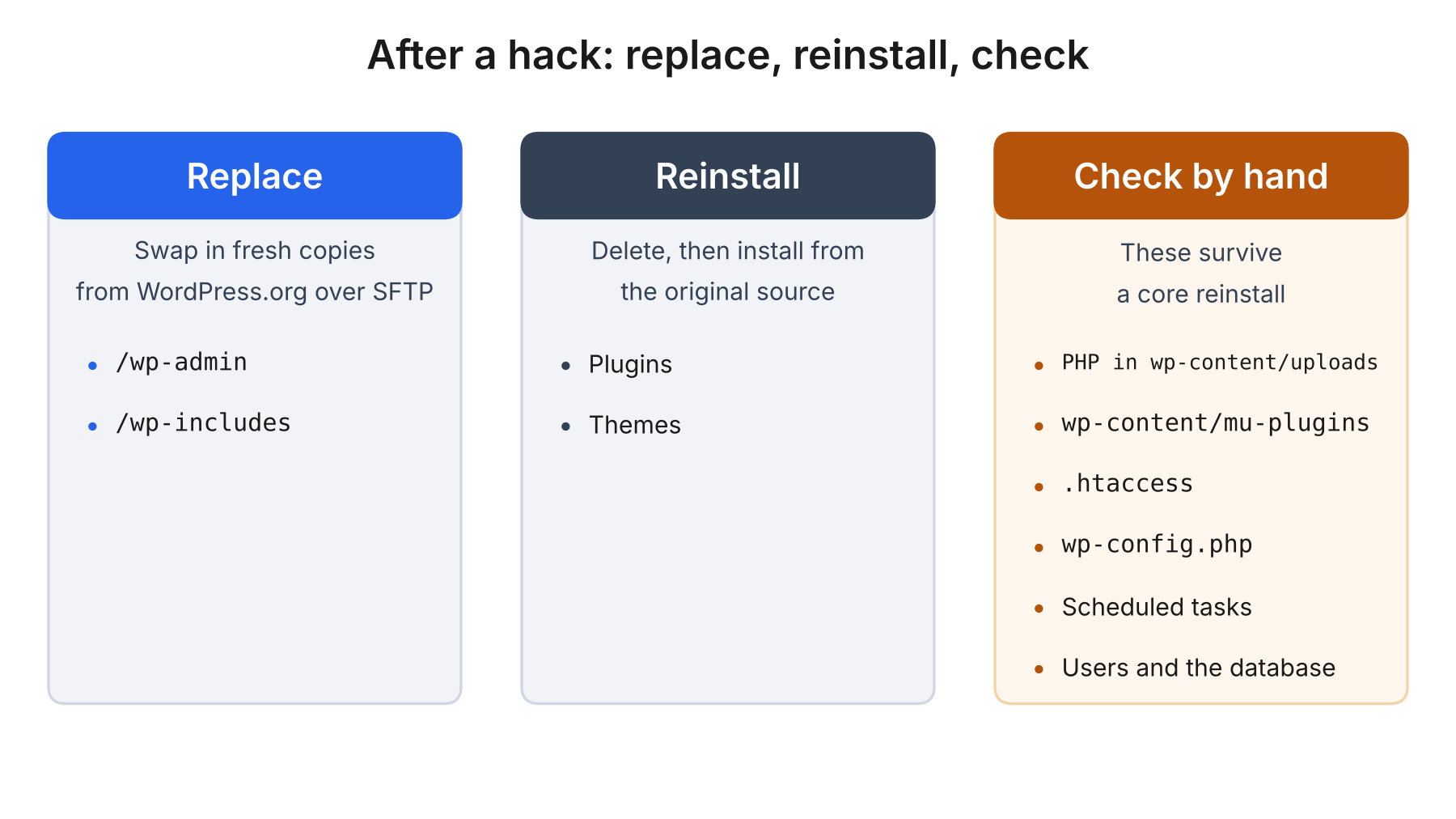
Start by replacing /wp-admin and /wp-includes with fresh copies from WordPress.org over SFTP. The WordPress.org hacked-site guide explains why one-click reinstalls fall short. Installers often only overwrite existing files, while hacks often add new ones. Delete your plugins and themes and reinstall them from their original sources instead of updating in place.
Then check the places that survive a reinstall. Look for PHP files in wp-content/uploads, the mu-plugins folder, .htaccess, wp-config.php, scheduled tasks, unfamiliar users and the database, where spam posts and injected scripts hide. Check the same hosting account for old WordPress installs and forgotten backups too, since a neglected copy can reinfect a clean site.
Run a scanner like Wordfence or Sucuri SiteCheck, but don't treat a clean result as proof, because scanners miss obfuscated code. If the same file keeps coming back, you've missed a mechanism, not a file.
Restore a backup or rebuild the site
Restore only if the backup is older than the first sign of the hack and you've closed the way in. Otherwise you're restoring the weakness along with the content. If you can't tell, rebuild on a fresh install and bring across the content, not the code. Test either route on a staging copy first.
How to remove Google’s This site may be hacked warning
Once the site is clean, open the Security Issues report in Google Search Console, select Request Review and describe what you found and fixed. Google says reviews can take several days or weeks, and hacked-with-spam cases can run to several weeks. Don't resubmit while one is pending.
While you wait, search site:yourdomain.com.au for pages you didn't create. Remove them so they return a 404 or 410, then request a recrawl of your key pages. If your email is bouncing or landing in spam, ask your host or email provider whether your domain has been blocklisted. Rankings can take a while to recover, and nobody can promise a date.
Who you need to tell about the hack
We're not lawyers, so treat this as a prompt to check. If the Privacy Act covers your business and personal information may have been accessed, the Notifiable Data Breaches scheme gives you 30 days from the moment you suspect a breach to assess it. If serious harm is likely, you notify the OAIC and the people affected. Many small businesses are exempt and some aren't, so check with the OAIC. A draft bill proposes a 72-hour deadline, so confirm the current rule.
You can also report the incident through ReportCyber, and if the site takes payments, tell your payment provider.
How to stop it happening again
Delete plugins and themes you don't use. Turn on multi-factor authentication for every admin. Keep an off-site backup, and restore it once to prove it works. Our guide to securing your WordPress site has the full list. A code from an authenticator app can still be phished in real time, so it isn't the whole defence.
Switch to a website with less to maintain: EffektAI websites
If you're recovering a WordPress site for the second time, it's worth asking whether the upkeep still suits your business. EffektAI Websites is how we build sites without it. We design, build and launch on AI-optimised hosting, so there's no CMS login to protect and no plugin queue to patch, and a person reviews every change before it goes live. Ongoing content and design changes are part of the plan.
It won't suit every site. Larger stores and custom features need scoping first, and you'd still want multi-factor authentication on your email and domain accounts. If you'd rather replace your WordPress site with something easier to run, our WordPress migration service can migrate your site and move your pages across.
Frequently asked questions
Why does my WordPress site keep getting hacked?
Usually something survived the cleanup, such as a webshell, a rogue admin, a stolen password still in use or a vulnerable plugin still installed. Cleaning only the files you can see isn't enough.
Can I just restore a backup and be done?
Only if the backup predates the first sign of the hack and you've closed the way in. Otherwise you're restoring the same weakness. Change every password first, then update everything you restore.
How long does Google take to remove the warning?
Google says reviews can take several days or weeks, and hacked-with-spam cases can run to several weeks. Fix everything before you request one, and don't resubmit while it's pending.
Is WordPress safe from hackers?
WordPress core is actively maintained, but wp2shell showed core can be hit too. Much of the risk sits in plugins, themes, passwords and how quickly patches get applied.